Hulp & Support How to change the audio language?
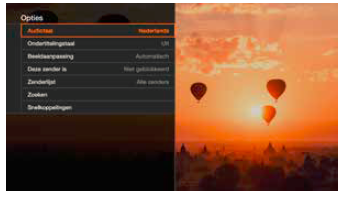
The audio language can be adjusted under the ‘Options’ menu. You can set the options according to your preferences.
Press ‘OPT’, then ‘Audio language’:
- select the language for the programme (in multi audio)
- select the use of subtitles if necessary as well as the language, manage your lists of favourite and blocked channels.
Setting the language of the interface of your decoder
The interface and the menus of your TV decoder are available in different languages (NL, FR, EN, DE). Go to Settings and 1. Languages: Display language selection. On the screen select the language of your choice and proceed to the next screen. You can also set your audio preferences (first and second language) and your subtitling preferences (subtitling language + option ‘subtitles for the hearing impaired’).
Attention:: It may be possible to select languages or subtitles on your screen that are not actually broadcast by the channel in question.